
TikTok doesn’t give drafts a one-tap “download” button the way it does with posted videos. If you’ve dug through the Drafts folder looking for an export option and come up empty, that’s normal — the feature is buried, and on some phones it’s missing entirely. Here’s every method that actually works in 2026, including what to do when the Save button doesn’t show up.
Can You Download a TikTok Draft to Your Camera Roll?
Yes, but not always with a single tap. Drafts live locally on your phone, inside TikTok’s own app storage — not in a shared folder you can browse. TikTok gives you two real paths to get a draft out:
- Open the draft and use the built-in Save button (works on some Android phones, rarely on iPhone).
- Post the draft with visibility set to Only Me and turn on Save to Device, which copies the finished video to your camera roll the moment it publishes.
Both keep every edit, sticker, effect, and caption exactly as you left them in the draft.
Method 1: Save Directly From the Drafts Folder (Android)
This is the fastest option when it’s available on your device.
- Open TikTok and tap Profile.
- Tap the Drafts folder above your grid of posted videos.
- Tap the draft you want to save so it starts playing.
- Look in the top-right corner for a Save icon.
- Tap it. The video downloads straight to your phone’s gallery app.
Not every Android build shows this button, and it almost never appears on iPhone. If you don’t see it, skip to Method 2.
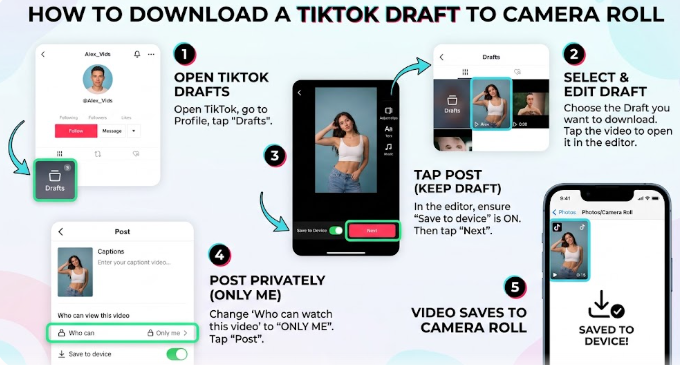
Method 2: Post Privately to Save to Camera Roll (iPhone & Android)
This is the method that works on every device, because it uses TikTok’s normal publishing flow instead of a hidden shortcut.
- Open the draft from your Drafts folder.
- Make any last edits, then tap Next.
- On the posting screen, tap Who Can Watch This Video (sometimes shown as a lock icon).
- Select Only Me. This keeps the video private — no one on TikTok will see it.
- Scroll down to More Options and turn on Save to Device (sometimes labeled “Save Video”).
- Tap Post.
As soon as the post finishes uploading, TikTok saves a copy to your camera roll at the same time. Open your Photos or Gallery app and it’ll be sitting right there with all your edits intact.
Once you’ve confirmed the video saved to your phone, you can safely delete the private post from your TikTok profile — deleting it from the app does not delete the copy already on your device.
How to Save a TikTok Draft Without the Watermark
Following Method 2 above already gets you a cleaner result than a standard “Save video” download, since it’s exporting your edited draft rather than re-downloading a compressed, watermarked repost. If you specifically want to avoid TikTok’s logo appearing in the corner:
- Stick to the Only Me + Save to Device method above rather than downloading an already-published video.
- Avoid the video’s on-platform “Save video” three-dot menu option on posts that are already public, since that path is more likely to include the watermark.
- If a watermark still shows up, it usually means the video was saved from a public post rather than exported through the private-post flow — repeat Method 2 from the original draft.
Troubleshooting: Save Button Missing or Draft Won’t Download
No Save button appears in the Drafts folder. This is expected on most iPhones and some Android models — TikTok hasn’t rolled the direct Save button out everywhere. Use Method 2 instead.
“Save to Device” toggle won’t turn on. Check that TikTok has permission to access your Photos or Storage in your phone’s system settings. Without that permission, the toggle either won’t stick or the video will publish without saving.
The draft disappeared before you could save it. Drafts are stored locally, not in TikTok’s cloud. Clearing the app’s cache, offloading the app, logging out, or switching phones can wipe them permanently. If a draft still exists, save it immediately rather than leaving it for later.
Only You / private videos suddenly won’t download. This has been a recurring, temporary glitch reported by creators. A common workaround is opening the video, switching its privacy from Only Me to Everyone for a moment, downloading it, then switching the privacy back.
Keep This From Happening Again
Because TikTok treats drafts as short-term staging rather than permanent storage, it’s worth building a habit around them:
- Save anything you care about to your camera roll the same day you create it.
- Keep your original raw clips backed up separately (cloud storage or your computer) — you can rebuild a draft from raw footage, but not the other way around.
- Save important drafts before installing a TikTok app update, since major updates occasionally corrupt or reset local draft storage.
Already Posted the Video? Download It Without Re-Editing
If the clip you’re after isn’t a draft anymore — it’s already live on TikTok, either on your own profile or someone else’s — you don’t need to go through the draft workflow at all. A TikTok video downloader can pull the posted video (or just the audio, if you’re after a TikTok to MP3 conversion) directly from the link, without the watermark and without touching your Drafts folder.
FAQ
Why can’t I just download a TikTok draft like a regular file? Drafts are stored inside TikTok’s app data, not as a standalone video file on your phone, so there’s no file browser shortcut to grab them.
Does saving a draft to camera roll remove the watermark? Using the private-post-and-save method keeps the video clean in most cases, since it exports your edited version rather than re-downloading a published post.
Will my draft transfer if I switch phones? Not automatically. TikTok doesn’t sync drafts to the cloud, so save anything important to your camera roll before switching devices.
Can I edit a draft after saving it to my camera roll? Yes — you can re-upload the saved video into TikTok’s editor via the “+” button, or edit it in any external video editor, since it’s now a regular video file on your phone.
What if I deleted a draft by accident? If you never saved it to your camera roll first, it can’t be recovered. This is the main reason to save drafts you care about as soon as you’re happy with them, rather than leaving them sitting in the Drafts folder.