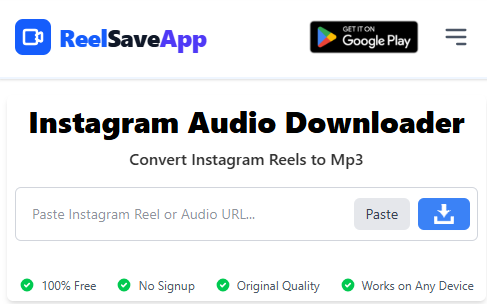
Instagram Audio Downloader
Convert Instagram Reels to Mp3
- 100% Free
- Original Quality
- Works on Any Device
Instagram Audio Downloader: Save Reels Audio as MP3
Nowadays Instagram is not just a platform for sharing pictures or videos, but also very popular for music, dialogues and viral sounds — which is exactly why Instagram audio download has become such a common need for so many users. Every day millions of new Instagram Reels and videos are uploaded where amazing audio is used.
Many times we want to save that song, background music or dialogue separately on the phone. But there is no facility to download audio directly on Instagram.
To solve this problem, our website has brought a simple and fast Instagram Audio Download Tool. Here you can download your favorite audio within a few seconds by just copying and pasting a link.
Features of Instagram Audio Downloader:
-
Extract audio from any reels or video
Just copy the link of the Instagram video or reels and paste it on our site. Within seconds, you can extract and download the audio of that video—without any app, completely online.
-
High-quality audio download
We have not compromised on the quality of the audio. Every download is delivered at up to 320kbps bitrate — crystal-clear, HD quality sound, so it's a pleasure to listen to songs, dialogues, or background music.
-
Fast download speed
Our servers are optimized, so it does not take time to process the video or audio. The download starts with one click—a completely smooth experience.
-
Works on all devices
No matter where you use it—mobile, tab or computer—our website will work equally everywhere. No software installation or registration hassle.
-
100% safe and privacy-protected
We do not store any downloaded videos or audio. Your data and usage information are completely safe.
-
Completely free service
Yes! All the features of our site are absolutely free. No subscription, login or payment required. Download as many audios as you want, without any limits.
-
Offline usage convenience
After saving your favorite audio, you can listen to it offline whenever you want or you can set it as your mobile ringtone. Songs, dialogues or viral trends—all will now be easily accessible on your phone.
How to download audio from Instagram reels?
Sometimes, we get bored listening to songs, background music or dialogues on Instagram that we want to listen to again and again. But the problem is — there is no option to download audio directly on Instagram. So we have brought a very simple, fast and secure Instagram Audio Download Tool, with the help of which you can download audio files in a few seconds.
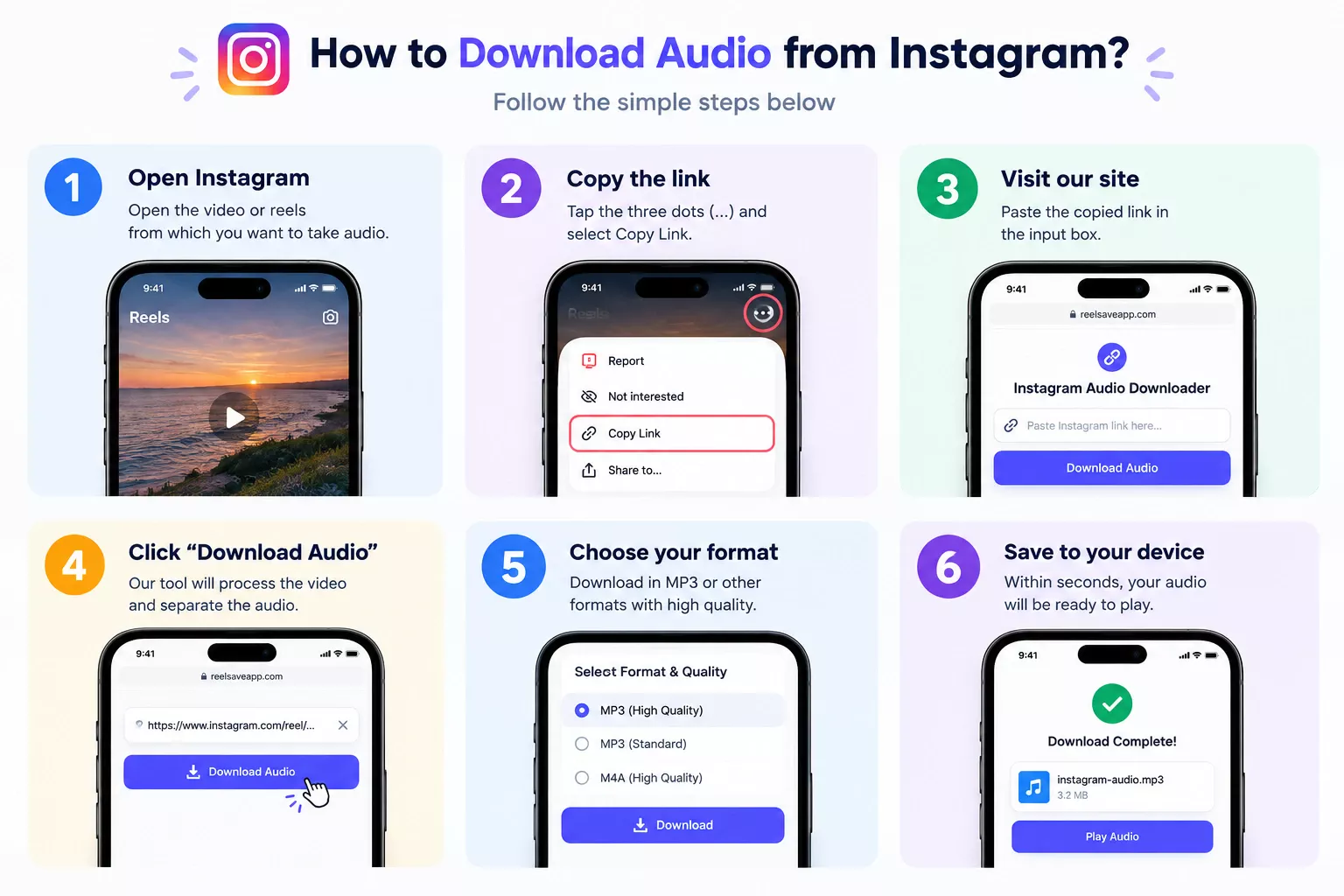
Follow the simple steps below
-
1
Open Instagram Open the video or reels from which you want to take audio.
-
2
Copy the link Click on the three dots (…) in the upper right corner of the video and select the Copy Link option.
-
3
Visit our site Now visit our website and paste the copied link in the input box.
-
4
Click on the “Download Audio” button Our tool will immediately process the video and separate the audio.
-
5
Choose your preferred format and quality You can download the audio in MP3 or other formats if you want, with crystal clear sound.
-
6
Complete the download Within seconds, your favorite Instagram audio will be saved to your device.
How to Save Instagram Audio on Any Device
Our web-based Instagram Audio Downloader is optimized to run smoothly across all major operating systems and browsers without installing additional software.
📱 Download Instagram Audio on Android
- Open the Instagram app and find the Reel or Video containing the sound.
- Tap the Share button and select Copy Link.
- Open Chrome or any browser, paste the URL in our downloader, and tap Download Audio.
- The MP3 file will be saved directly to your phone's Downloads folder.
🍏 Download Instagram Audio on iPhone (iOS)
- Copy the Reel URL from the Instagram app on your iPhone.
- Launch Safari, navigate to our site, and paste the copied link.
- Tap Download Audio to extract the sound track.
- Once processed, confirm the download in Safari. You can find the file in your Files App > Downloads.
💻 Download Instagram Audio on PC & Mac
- Open Instagram in your web browser (Chrome, Safari, Firefox, Edge).
- Copy the post or Reel URL directly from the address bar or share icon.
- Paste the URL into our tool and click Download Audio.
- Save the high-quality MP3 directly to your preferred computer folder for offline listening or editing.
Why People Download Instagram Reels Audio
Instagram has become one of the biggest sources of trending music, viral dialogues, and creative sound effects. From motivational voiceovers to emotional movie dialogues and remix sounds, many audios become popular long before they are officially released on music platforms.
Content creators, video editors, and everyday users often want to save these audios for personal use. Some people like to listen to a motivational speech repeatedly, while others want background music for video editing, status videos, or offline playlists. Downloading Instagram audio makes it easier to reuse or enjoy these sounds without needing an internet connection.
Our Instagram Audio Downloader is designed to meet all these needs in a simple and responsible way. It focuses on ease of use, speed, and quality so that anyone—even non-technical users—can download audio without confusion.
Common Use Cases of Instagram Audio Download
- Listening offline: Save your favorite Instagram songs or dialogues and listen anytime without using mobile data.
- Video editing: Use downloaded audio in personal video edits, reels drafts, or short clips.
- Learning and inspiration: Many educational, motivational, and spoken-word audios are shared on Instagram. Saving them helps users revisit useful content again.
- Trend tracking: Content creators often analyze trending audios before creating new videos. Downloading audio makes it easier to study rhythm, timing, and style.
Supported Audio Formats and Quality
Our tool focuses on providing widely compatible audio formats so that the downloaded file works on almost every device. Most users prefer MP3 because it offers a perfect balance between quality and file size. However, depending on availability, you may also get M4A or similar high-quality formats.
The extracted audio maintains clarity and loudness without unnecessary compression. This means dialogues remain crisp, background music stays balanced, and vocals sound natural. We do not artificially distort or downgrade audio quality during the extraction process.
Is Downloading Instagram Reels Audio Legal?
Downloading Instagram audio should always be done responsibly. Our tool is intended for personal and fair-use purposes such as offline listening, learning, or reference. We do not encourage re-uploading copyrighted content or using audio for commercial redistribution without permission.
Instagram content belongs to its respective creators. Users are advised to respect copyright laws and platform terms while using any downloaded audio. If you are a content owner and believe your content should not be processed, you should avoid sharing public links.
Tips for Best Download Experience
- Always copy the full and correct Instagram link before pasting it into the input box.
- Make sure the Instagram post is public; private videos may not be accessible.
- Use a stable internet connection for faster processing and download speed.
- If the download does not start, refresh the page and try again.
Why Choose Our Instagram Reels Audio Downloader?
There are many tools available online, but most of them are filled with unnecessary ads, forced sign-ups, or confusing steps. Our platform focuses on simplicity, transparency, and user comfort.
We do not require personal information, account login, or app installation. Everything works directly from the browser, making it lightweight and accessible. Whether you are a casual listener or a creator, the process remains the same—fast and straightforward.
We also continuously improve our tool to match Instagram updates and user needs. Our goal is to provide a reliable service that users can trust and return to whenever they need to download audio.
Instagram Ringtone Download: Turn a Reel Sound Into Your Ringtone
Sometimes you hear a catchy sound on Instagram and want it as your phone ringtone. Instagram does not offer a ringtone download option, so the simplest method is to save the audio first and then trim it to a short clip on your phone.
Start by pasting the reel link into our Instagram Audio Downloader above and saving the sound as an MP3. Then cut it down to 10 to 30 seconds using any audio trimmer app, and set it as your ringtone with the steps below.
How to set an Instagram sound as a ringtone on Android
- Copy the reel link and download the audio using our tool.
- Trim the MP3 to a short clip with an audio editor app.
- Open Settings, go to Sound & vibration, then Phone ringtone, and choose the file from your Downloads folder. Menu names can vary slightly by phone brand.
How to set an Instagram sound as a ringtone on iPhone
- Download the audio from the reel link using our tool.
- Trim the clip in an app such as GarageBand, keeping it to 30 seconds or less, and export it as a ringtone.
- Go to Settings, then Sounds & Haptics, then Ringtone, and select the new ringtone.
Keep the clip short, since long ringtones get cut off on many phones. Use the audio only for personal purposes, and respect the rights of the original creator.
Frequently Asked Questions (FAQ)
Is Instagram Audio Download a free service?
Can I download Instagram audio from mobile?
Can I download audio without logging into my Instagram account?
What will be the quality of the audio downloaded from this site?
Can I also download audio from Reels videos?
Will my data be safe while downloading?
Can I download multiple audios at once?
Do I need to install any software to use this site?
Can I listen to the downloaded audio offline?
How do I set an Instagram reel sound as my ringtone?
How long should an Instagram ringtone be?
Can I use an Instagram sound as a ringtone on iPhone?
Final Words
Instagram audio plays a huge role in modern digital culture. From entertainment to education, sounds and music shape how content is consumed and remembered. With our Instagram Audio Downloader, saving those moments becomes easy and stress-free.
We're not limited to Instagram anymore. You can also use our Facebook to MP3 converter and TikTok to MP3 converter to save both MP3 audio and the original MP4 video from those platforms.
If you frequently come across audio that you want to keep, this tool is built exactly for you. Just copy, paste, and download—no complications. We hope this service adds value to your daily digital experience.