
Audio matters on Instagram Reels because the algorithm listens just as closely as it watches. In 2026, the Reels ranking system evaluates six core signals: watch time, completion rate, saves, shares, trending audio, and account consistency. The algorithm even analyzes the audio track itself to determine topical relevance.
Trending sounds are not just a vibe—they are distribution fuel:
-
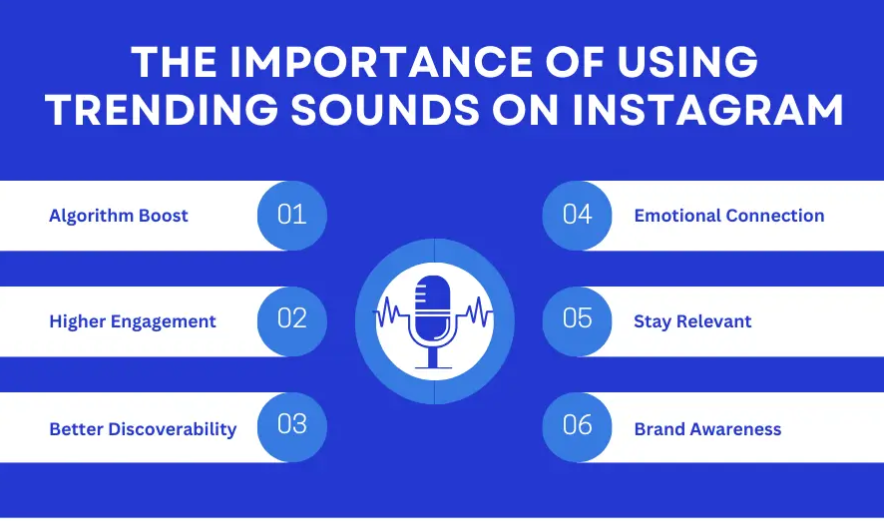
Increased Reach: Reels using trending audio during the optimal window can see a 20% to 40% boost in organic reach compared to the same clip with a neutral track.
-
Higher Engagement: The algorithm actively rewards the usage of trending clips, spreading your content to broader audiences.
-
Better Discoverability: Strong early engagement signals push your Reel from a small test group straight to the Explore page and non-follower feeds.
-
Reels Feed Velocity: Completion rates above 70% make a Reel three times more likely to hit Explore, and trending audio helps keep viewers hooked to reach that threshold.
What Exactly Is Trending Audio?
Trending audio refers to any song or original sound experiencing a sharp, sudden spike in usage across Instagram Reels. It is distinct from other audio types:
| Audio Type | Definition & Use Case |
| Trending Audio | Sounds spiking in velocity; marked with an upward-trending arrow icon. |
| Original Audio | Audio recorded by you or another creator, directly credited to that specific account. |
| Licensed Music | Popular tracks from major labels housed inside Instagram’s Music Library (primarily intended for personal, in-app use). |
Sounds go viral because creators iterate on them quickly, and viewers save and share them. This familiarity lowers the cognitive load for the viewer—people stay because they recognize the sound, waiting to see your unique twist.
How Instagram Determines a Trend
While Instagram does not publish its exact formula, 2026 data reveals four primary algorithmic drivers:
-
Usage Frequency: How many Reels adopt the sound within a condensed timeframe.
-
Engagement Velocity: Saves and shares matter far more than likes for signaling lasting value.
-
Initial Test Groups: Watch behavior within the first 24 to 48 hours determines if distribution expands.
-
Creator Adoption: When multiple creators within a specific niche adopt a sound, the system flags it as a rising trend.
The Lifecycle of a Trend:
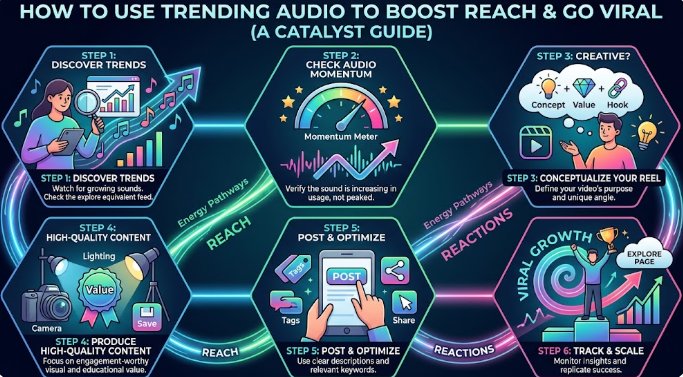
Rise Phase (0–48 hours): Low usage, no algorithmic boost yet.
Peak Window (48–120 hours): High velocity, optimal algorithmic boost.
Saturation Phase (120+ hours): Mass adoption; the algorithmic boost fades.
How to Find Trending Audio on Instagram
Method 1: Browse the Reels Feed
Dedicate 10 minutes a day to scrolling your feed. If you hear the same track across completely different niches (e.g., fitness, cooking, and comedy), save it immediately. Cross-niche repetition is the earliest human signal of a viral trend.
Method 2: Spot the Trending Arrow
Look at the bottom-left corner of a Reel. A standard track displays a music note icon. When a sound is spiking, that note is replaced by an upward-pointing arrow. Tap the arrow to see the total usage count and save the audio. Inside the audio picker, Instagram also features a Live Top 50 chart indicating whether a sound is rising (green arrow) or cooling off (red arrow).
Method 3: Follow Trend-Focused Creators
Keep tabs on accounts that track trends for a living:
-
The official @Creators account on Instagram (they regularly post Reels trend carousels).
-
Social media platforms and agencies like Later, Buffer, and Hootsuite.
-
Niche influencers within your industry who consistently land on the Explore page.
Method 4: Explore the Native Audio Library
When creating a Reel, tap the Music icon Trending to browse the top 50 tracks. Bookmark them using the save icon for easy access later.
Note: If you have a Professional account in the US, you can access this via Profile >Professional Dashboard > Tips and Resources > Trending Audio.
Method 5: Analyze Competitors and Cross-Platform Spikes
Audit 5 to 10 top competitors weekly. Check their viral Reels to see how fast the audio’s usage count is growing. If a sound jumps by 5,000 uses overnight, it is in its peak window.
Bonus Tip: Monitor TikTok and YouTube Shorts. Many audio trends break there 24 to 48 hours before crossing over to Instagram.
How to Use Trending Audio Effectively
Match Audio with Content
Relevance beats reach every time. Blaring a heavy electronic dance beat over a serious tax-tips Reel confuses viewers and ruins your completion rate. Ensure the audio amplifies your message rather than distracting from it.
Hit the Timing Sweet Spot
Do not jump on a trend at hour zero; wait for data to validate it. The algorithmic sweet spot is 48 to 120 hours after a sound begins its rise.
Add a Unique Twist
The algorithm rewards originality, even within established trends. Instead of copying others exactly, try these creative pivots:
-
Subvert Expectations: Pair a melancholy sound with a massive professional win.
-
On-Screen Text Reframing: Use contextual text overlays to completely alter the meaning of the audio.
-
The Remix Feature: Utilize side-by-side video layouts to offer live commentary.
Pair Trends with High-Impact Visuals
An incredible track cannot save a weak visual. Because 65% of viewer drop-offs occur within the first 2 to 3 seconds, you must hook your audience instantly. Skip the slow introductions (“Hey guys…”) and start immediately with the payoff.
[0-3 Seconds: The Hook/Payoff] ──► [3-10 Seconds: Dense, Fast-Paced Value] ──► [End: Clear CTA]
Best Content Formats for Trending Audio
-
Educational Reels: Pair a upbeat trending track with a rapid 3-step tutorial, ending with a “Save this” prompt.
-
Before-and-After Transformations: Time the visual reveal to perfectly match the beat drop.
-
Product Demonstrations: Use looping audio tracks to encourage viewers to watch the clip twice.
-
Lifestyle Content: Use recognizable, cinematic tracks to set the mood for day-in-the-life montages.
Common Mistakes to Avoid
-
Using Expired Trends: Using a sound after the 120-hour window means competing with hundreds of thousands of existing videos without an algorithmic boost.
-
Ignoring Audience Alignment: Forcing off-brand audio onto your page damages audience trust and brand authority.
-
Over-relying on a Single Track: Repetitive use of the exact same sound can result in algorithmic penalties for low-effort content.
-
Sacrificing Quality for Virality: A trending track will not save blurry, low-resolution, or watermarked videos. Instagram actively demotes recycled content containing watermarks from other platforms.
Organizing and Planning Around Trends
Managing Your Audio Collection
When you save a sound, it goes to Profile > Menu > Saved >Audio. Mentally categorize your saved tracks into functional buckets: Hooks, Tutorials, Transitions, or Business-Safe.
Note: If a saved sound suddenly disappears, it is almost always due to localized licensing changes.
Building a Content Calendar
-
Under 10k Followers: Aim for 3 to 5 Reels per week.
-
Over 10k Followers: Aim for 2 to 3 high-quality Reels per week.
Consistency builds algorithmic trust far better than sporadic content bursts. Batch-film your video footage early in the week, and assign trending audios later in the week when the data confirms which sounds have entered their peak window.
Trending Audio for Business Accounts
Music Licensing Constraints
Yes, business accounts can use trending audio, but with strict legal limitations. Commercial access to the licensed music library varies by region due to copyright agreements. If your Business account sees fewer popular songs than a Personal or Creator profile, this is a legal safeguard, not an app bug.
Safe Workarounds for Businesses
-
Create Original Audio: Record an original voiceover or talking-head video. If your audio goes viral, every creator who reuses it drives traffic back to your business page.
-
Meta Sound Collection: Utilize Meta’s built-in, royalty-free audio library designed specifically for commercial use across Facebook and Instagram.
-
Creator Partnerships: Collaborate with a Creator account to post a joint Reel organically using a trending track.
⚠️ Important Advertising Note: A Reel that performs exceptionally well organically with a commercial track may be muted or rejected if you attempt to turn it into an ad. Before boosting a post, duplicate the video edit, swap the audio track to a Meta Sound Collection song, and ensure you hold the proper commercial license.
Pro-Tips for Maximizing Viral Potential
-
Prioritize Consistency: Posting 3 high-quality Reels per week for two months yields significantly better algorithmic data than posting daily for a week and then going silent.
-
Targeted Hashtags: Use 3 to 5 highly specific niche hashtags to help the system categorize your video. Avoid using 30 generic tags.
-
SEO-Optimized Captions: Write descriptive captions loaded with keywords your target audience searches for, and always end with a question to drive comments.
-
The 60-Minute Engagement Window: Reply to comments within the first hour of posting. Rapid dialogue signals high community value to the ranking system.
-
Audit Your Analytics: Monitor your Average Play Time against the total video length. If viewers drop off before the 50% mark, refine your visual hook. If it stays above 80%, scale that specific format.
Frequently Asked Questions
How often should I use trending audio?
Aim for a balanced mix: 60% to 70% trending audio for discoverability, and 30% to 40% original audio or niche-specific sounds to establish brand authority and originality.
Can old trending audio still work?
Yes, but only if it fits your storytelling perfectly and you provide an entirely fresh creative angle. Do not expect an algorithmic distribution boost from a saturated or dead trend.
How do I definitively know if a sound is trending?
Look for the upward-pointing arrow next to the audio name, check the Top 50 Trending chart within the native audio picker, and verify that the overall clip usage count is climbing rapidly day-over-day.
Does trending audio guarantee viral results?
No. Audio is only one of six core algorithmic signals. If your video lacks a strong 2-second visual hook, fails to maintain watch time, or fails to generate saves and shares, the video will stall regardless of how popular the song is.
Conclusion
Trending audio is an incredible accelerator for Instagram Reels, but only when it is timed correctly—ideally 48 to 120 hours into its growth cycle—and paired with high-value content that viewers actually finish.
The algorithm is not a lottery; it is a predictable system that rewards watch time, retention, saves, and consistency. Save your sounds early, track your retention analytics, and maintain a library of business-safe alternatives so you are always ready to ride the wave rather than chasing it after it breaks.